
10 Comments
Paying administration charges and processing fees in Peru

Paying administration charges and processing fees in Peru

How to pay fees and charges at a Banco de la Nacion branch and on págalo.pe

All administrative charges, processing fees, and fines levied by Peruvian government agencies, public authorities, and public entities must be paid through the Banco de la Nación. This guide shows how it's done.

For years paying fees or fines meant standing in long lines at one of the bank’s numerous branches. Since 2018, however, most fees can also be paid online via the website or app pagalo.pe, making the process much faster and more convenient.

Below you’ll find everything you need to know about paying fees in Peru, whether in person at a bank branch, at selected ATMs, or online.


Table of contents


General information about paying charges, fees, and fines in Peru

Today, both Peruvians and foreigners can still pay administrative charges at any Banco de la Nación branch. In addition, many payments can be made:

  • at selected Banco de la Nación ATMs
  • online via pagalo.pe (website or app) using Visa, Mastercard, or American Express debit or credit cards
  • via the Yape app

No matter which payment method you choose, you must know the following before paying:

  • Which authority charges the fee
  • The payment code for the administrative procedure
    • For example:
      • 07568 – Migraciones: Change of immigration status
      • 08141 – PNP: Interpol clearance
      • 05533 – Ministry of Labor: Registration or modification of foreign employment contracts
      • 06637 – Reniec: Copy of a Peruvian birth or marriage certificate
  • The correct “concepto” - Some payment codes cover several different procedures

Important: Make sure you select the correct authority, code and, if applicable, concepto and pay the correct amount for the procedure under your name and document number, as incorrect payments are not accepted later and it's a hassle to get a refund.


How to pay charges, fees and fines at a Banco de la Nacion branch

Since the introduction of the online payment system pagalo.pe (see below how it works), lines at Banco de la Nación branches are usually much shorter than before, and payments are often processed fairly quickly (at least by Peruvian standards).

When it’s your turn, simply tell the teller:

  • the authority
  • the payment code
  • and, if applicable, the concepto

If you don’t know the code or concepto, staff members are usually able to help.

Additionally, you must present an ID:

  • Foreign tourists: passport
  • Foreign residents: carné de extranjería (CE
  • Peruvians: DNI

Important things to keep in mind

  • Payments are registered under your name and document number. Payments made under another person’s name are not accepted. 
  • Before leaving the counter, check the receipt carefully. Make sure that your name is spelled exactly as in your passport, CE, or DNI and that your document number is 100% correct. Even small spelling mistakes or inconsistencies can cause the payment to be rejected later.
  • Some branches only accept payments if you first created a voucher on pagalo.pe (see below)
  • ATM payments are only possible at selected Banco de la Nacion ATMs and with a voucher

And very important:
Keep the receipt safe. Depending on the procedure, you will later need it either as proof of payment or to enter specific receipt details in online application forms.


How to pay charges, fees and fines using pagalo.pe

In early 2018, the Banco de la Nación launched its online payment platform pagalo.pe. Via the website or app, you can pay many administrative charges quickly and easily online using a Visa, Master or American Express debit or credit card or the Yape app.

Since its launch, the number of fees available online has grown significantly; and more are added regularly. So before heading to the bank, it’s always worth checking pagalo.pe first.


How to register on pagalo.pe and create an account

To use pagalo.pe, you must first register and create a personal account, either on the pagalo.pe website or via the app.

Do not use someone else’s account to pay your fees. Most administrative payments are personal, and payments made under another name are usually not accepted later.

Creating an account on pagalo.pe

Creating an account is straightforward:

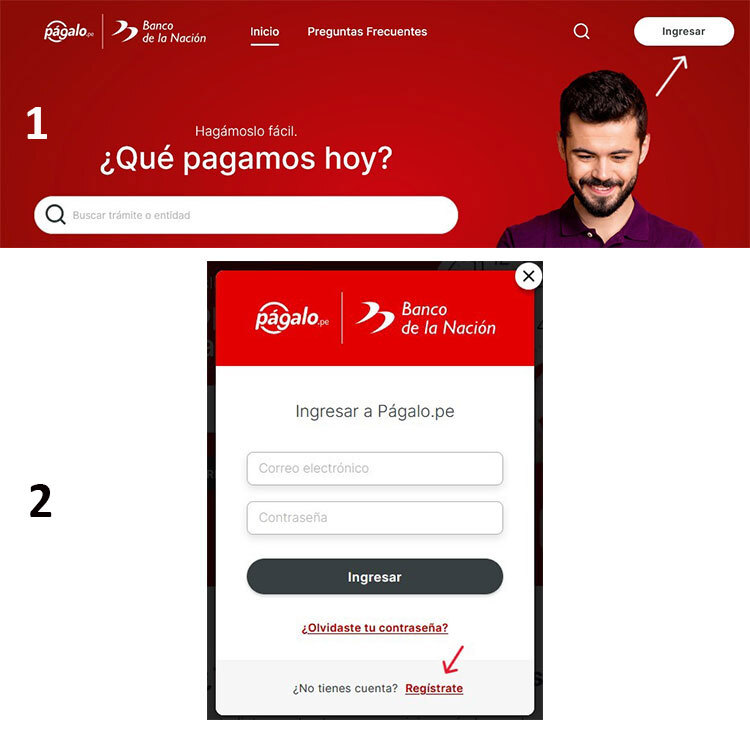
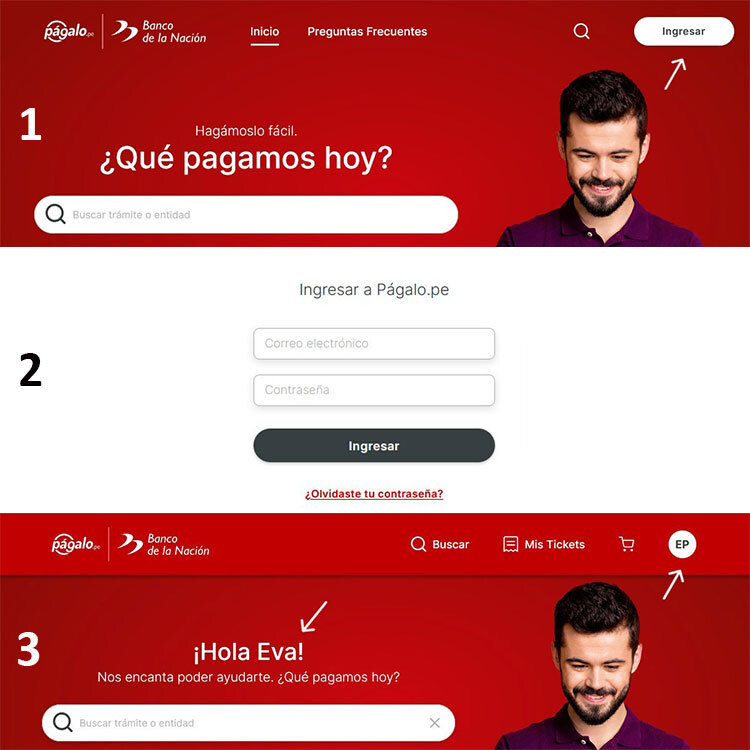
  1. Click Ingresar on the pagalo.pe homepage
  2. In the pop-up window do not enter anything, just click Regístrate 
Registration on pagalo.pe
To use pagalo.pe you first must register and create an account

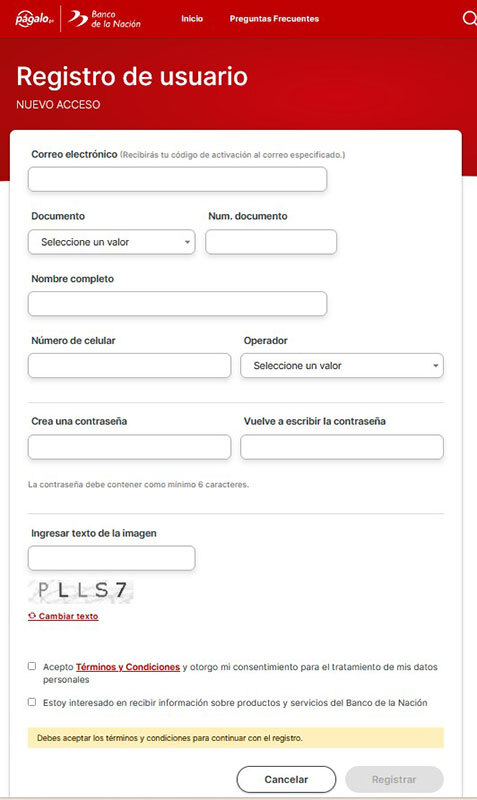
The Registro de usuario page opens.

Registration on pagalo.pe
The first step to pay fees and administrative charges in Peru is to register and create an account on pagalo.pe

You are asked to enter: 

  • Correo electronico:
    Enter a valid email address you have full access to. An activation code will be sent to this address.
  • Documento/ Num. documento:
    Select Pasaporte (or CE/DNI, if applicable) and enter the corresponding number.
  • Nombre completo:
    Enter your full name exactly as shown in your passport, CE, or DNI.
  • Numero de celular/Operador:
    Enter a cell phone number and select the Peruvian operator. Ideally, enter a Peruvian mobile number. If you don’t have one, select any operator and enter a 9-digit number (for example, your home number shortened to 9 digits). Pagalo.pe won't send messages via phone, all notifications are sent by email.
  • Crea una contraseña/Vuelve a escribir la contraseña:
    Create a password of your choice and confirm it.
  • Ingresar texto de imagen:
    Enter the captcha.
  • Accept the terms & conditions.

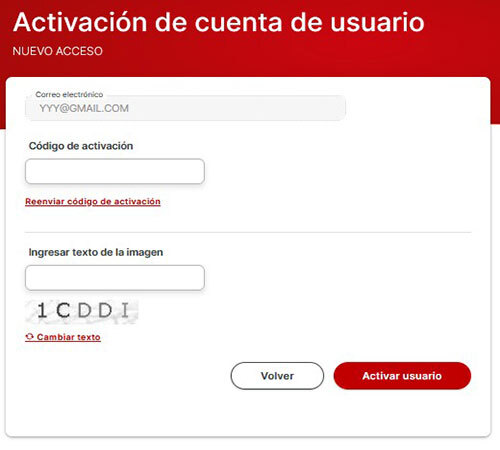
After clicking Registrar a new window opens and you are asked to activate your pagalo account using a code sent to your email. 

Registration on pagalo.pe
To finalize your registration on pagalo.pe enter the activation code, which is sent to your e-mail address

So, check your email for a message from pagalo.pe. If you don't see it, check your spam folder. 

Now, just enter the activation code and the captcha and click on Activar usuario.

You made it! Your pagalo.pe account is activated and ready to use.


How to pay using pagalo.pe or create a voucher to pay at a Banco de la Nacion branch / ATM

To make online payments or to create a voucher to pay in cash, you now only have to log into your pagalo.pe account.

How to login to your pagalo account
To make payments on pagalo.pe you first have to log in to your account
  1. Click Ingresar on the pagalo.pe homepage.
  2. Enter your e-mail address and password and click on Ingresar.
  3. You are re-directed to the main page and are logged in.

If you haven't registered yet and don't have an account, see How to register on pagalo.pe and create an account above.

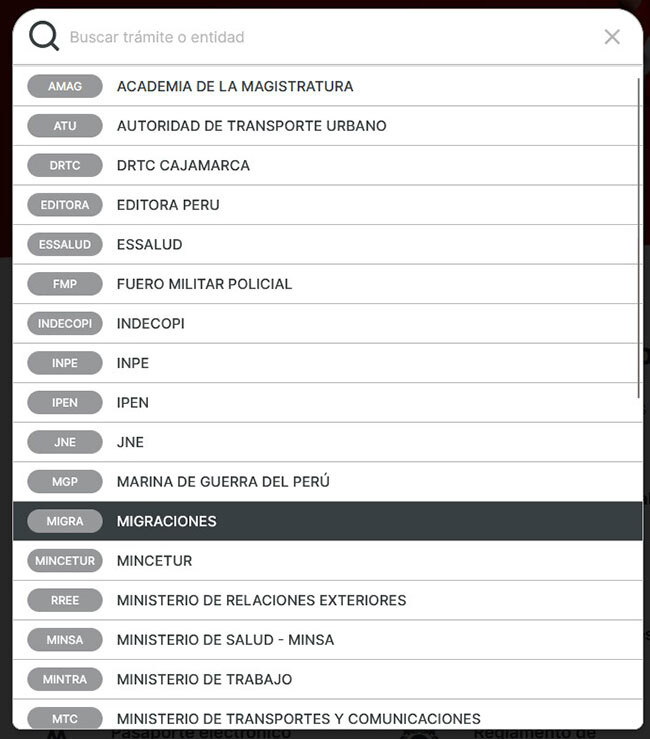
Next, click on “Buscar trámite o entidad” and this drop-down list is displayed.

Making online payments on pagalo.pe
To make payments using pagalo.pe or to create a voucher for cash payment, after logging into your account first choose the authority (for example, Migraciones) 

Select the authority, for example, Migraciones, and you see a list with all Migraciones administrative procedures including codes that you can pay online.

Making payments using pagalo.pe
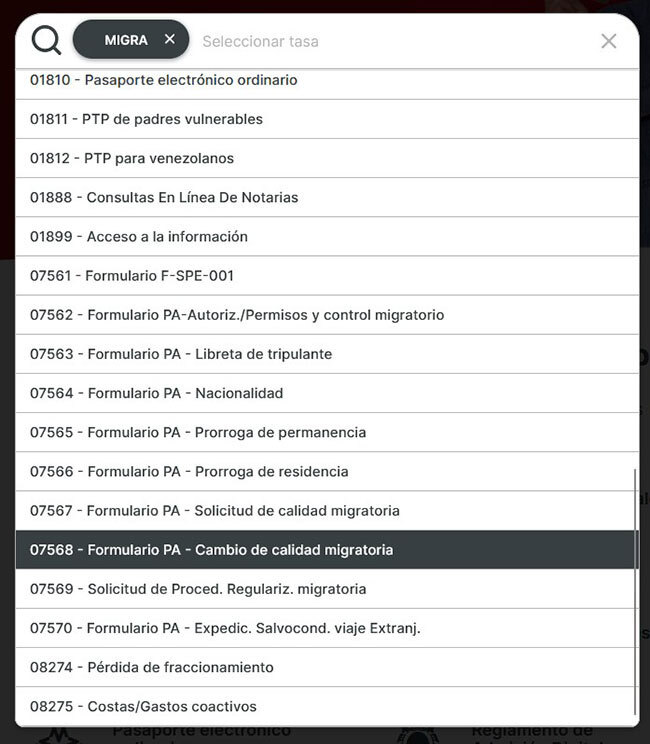
After you chose the authority, select the procedure you want to pay (for example, 07568 Cambio de calidad migratoria)

Choose the procedure you want to pay. In this example 07568 - Cambio de calidad migratoria

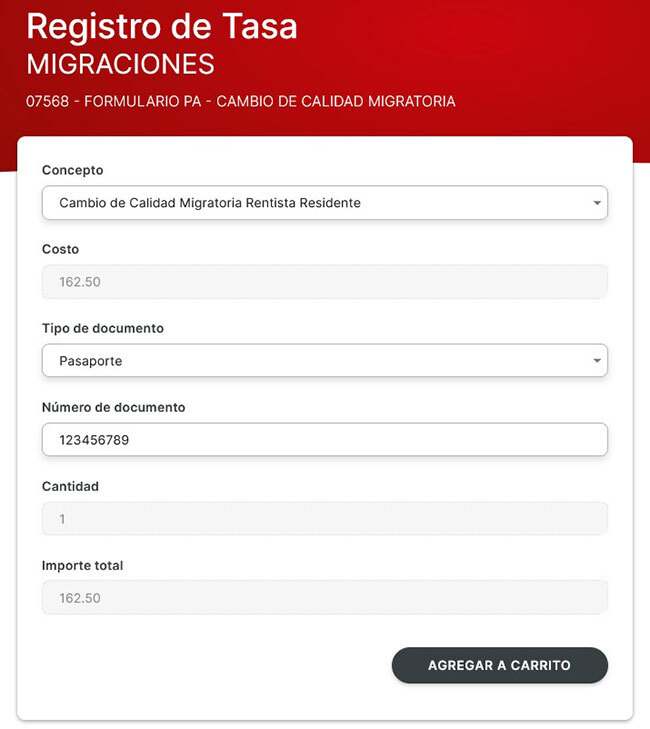
You are now on the Registro de Tasa page. 

Making payments on pagalo.pe
After you chose the procedure, selecy the concepto (for example, Cambio de calidad migratoria rentista residente) and enter other required fields

Now just enter the information required:

  • Concepto:
    Some payment codes cover several different procedures. So, if applicable, first choose a “Concepto” (in this example, Cambio de calidad migratoria rentista residente) .
  • Costo:
    Automatically filled in after selecting the concepto.
  • Tipo de documento/Numero de documento:
    Select pasaporte (or, if applicable, CE or DNI) and enter your passport (CE or DNI) number.

Then click on Agregar a carrito and you get to your "shopping cart".

Making payments on pagalo.pe
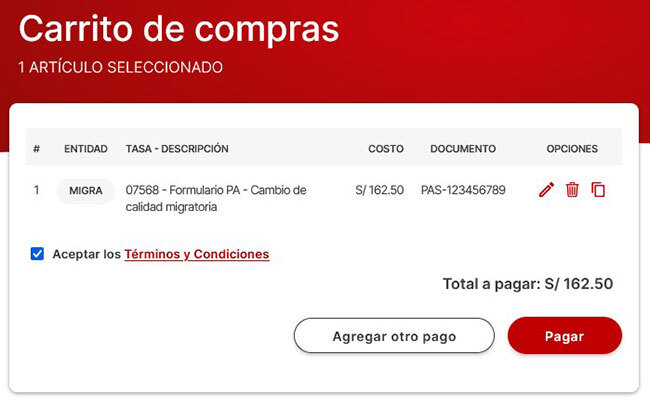
Your pagalo.pe "shopping cart" 

Carefully check that all details are correct. If anything is wrong, edit or better delete the entry under "Opciones" and start over.

If needed, you can add other payments under "Agregar otro pago".

When you are ready, accept the terms and conditions. Click Pagar and you see the Metodo de pago page.

Making payments using pagalo.pe
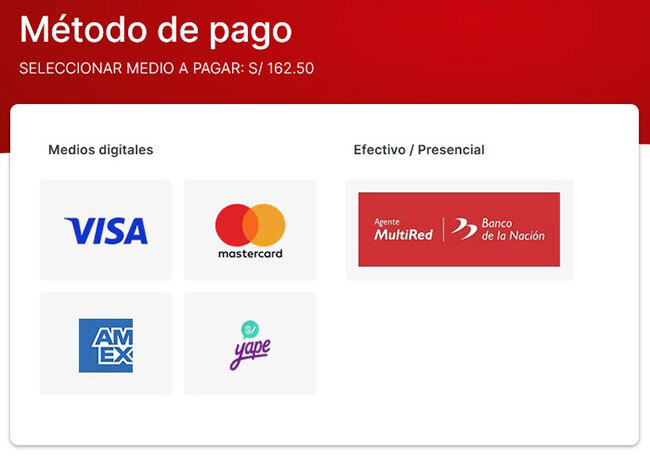
To finalize your payment on pagalo.pe, select your payment method.

Choose your payment method. You can pay using:

  • your Visa, Master, or American Express card (debit or credit)
  • Yape

Just follow the instructions. Once payment is completed, a receipt is sent to your registered email address.

Next to paying by card or Yape app you can also generate a voucher by clicking on the red Banco de la Nacion icon to pay in cash at a Banco de la Nación branch or selected Banco de la Nación ATMs. The voucher is sent to your registered email address. 

You made it!


A final note

No matter whether you pay online or at a Banco de la Nación branch or ATM, keep your receipt safe. You will need it later - either as proof of payment or to enter specific receipt details in online applications (for example, when applying for a residence visa).

Also note that payments may take a few minutes up to an hour to be fully processed. If you pay after business hours or on a Sunday or public holiday, processing may even take until the next business day. So give it a bit of time before entering payment details in online systems such as the Agencia Digital.


Please note: LimaEasy is not a Peruvian government agency, public authority, or law firm. The information provided is based on our best knowledge and is intended as general guidance to help you understand Peruvian immigration regulations and procedures. Regulations, requirements, and administrative practices may change at any time and without prior notice, so we recommend verifying current details with the relevant authorities before acting on this information.

And last but not least: If you notice any inaccuracies or outdated information on this page, please help us keep this guide up to date by leaving a comment below or contacting us via our contact form. Thank you for your support!

Say something here...
characters left
or post as a guest
All comments MUST be in English and will be moderated before publishing.
They will appear below within 24 hours.
Loading comment... The comment will be refreshed after 00:00.
  • This commment is unpublished.
    Bunke · 14/10/2025
    I recently opened a Pagalo.pe account and although my account has been established I never received an activation code so I am unable to pay for any services.  Any advice would be much appreciated.
    • This commment is unpublished.
      Sunflower
      • LimaEasy
      · 14/10/2025
      @Bunke
      Hello Bunke,

      quite often, especially if you used a gmail or outlook e-mail address the notification with your activation code ends up in your spam/junk folder. Or you could have misspelled your e-mail address.

      So, best check your spam/junk folder for the code. Another option, try to create another account and make sure that your e-mail address is correct. Or you could always pay a Banco de la Nacion branch a visit and pay there in person. 

      Greetings
      Eva
    • This commment is unpublished.
      Bunke · 17/10/2025
      @Sunflower Everything was spelled correctly and Pagalo.pe sent confirmation emails to both my and my husbands email accounts but no activation codes for either.

      We are here on a 90 day tourist visa and intend to overstay for 15 days in late November.  Would it be possible to pay the fine at the new airport or at any branch of Banco de la Nacion or does it have to be at a particular branch.

      We are also wondering about the Immigration Control Number as we were not given one on arrival.

      Many thanks in advance for your help,

      Best wishes,

      Bunke
    • This commment is unpublished.
      Sunflower
      • LimaEasy
      · 17/10/2025
      @Bunke
      Hello Bunke,

      that's strange. So, I just tried to create a new account on pagalo.pe to see for myself if something changed. But unfortunately I got an error message that my request was denied and I couldn't create a new account. Not sure what's going on. 

      Anyway, if you overstay you can pay the overstay fine at any Banco de la Nacion branch - you will need your passport, the code of the administrative procedure (for paying the overstay fine it’s 00675) and the number of days you overstayed. You as well can pay directly at the airport. You find detailed information on how it's done in our Peruvian overstay fine article

      And I don't know what you mean with "Immigration Control Number". When you entered Peru your entry and the number of days you are allowed to stay as a tourist were automatically registered in the Migraciones database. No stamp in your passport and no number. However, you can check your entry, the so-called TAM virtual, online on the Migraciones website under Consultas en linea TAM virtual. You find detailed information on how it's done in our article How many days did I get

      Have a nice weekend
      Eva
    • This commment is unpublished.
      Bunke · 17/10/2025
      @Sunflower Thank you so much for your help, much appreciated.  Wishing you a good weekend too! 
  • This commment is unpublished.
    Stephanie Moore · 28/08/2025
    Hi Eva….hopefully this will be useful info for you.  I tried to apply for a refund for the incorrect tramite in the agencia virtual under “devolución de pagos.”  As it turns out, the system will only accept payment made at Banco de la Nación and will not accept payments from any other platform.

    Here’s a copy from the info about their services online this morning:

    SÓLO SE PRESENTARÁN POR ESTA VIA RECIBOS DEL BANCO DE LA NACIÓN, NO PROCEDE SOLICITUDES DE DEVOLUCIÓN EN LINEA LOS PAGOS EFECTUADOS POR: PAGALO. PE, AGENTES MULTIRED Y PAGOS CON TARJETA VISA O MASTERCARD, ESTOS CASOS PARA LIMA LA SOLICITUD DE DEVOLUCIÓN DEBERÁ PRESENTARSE EN LA AV. ESPAÑA N°610 – BREÑA, Y PARA PROVINCIAS LA SOLICITUD DE DEVOLUCIÓN SE PRESENTARÁ EN LAS JEFATURAS ZONALES DE MIGRACIONES.

    It appears the only way to request a refund if you paid for the tramite on págalo.pe is to take your receipt to an Immigration Office and they will have to help you process the request for a refund….FYI…
    • This commment is unpublished.
      Sunflower
      • LimaEasy
      · 30/08/2025
      @Stephanie Moore
      Hello Stephanie,

      thank you so much for this valuable info. I didn't know that. So, it seems no way around paying the Migraciones office in Breña a visit to get your money back.

      I wish you all the best.

      Have a nice weekend 
      Eva
  • This commment is unpublished.
    Jen · 12/06/2025
    If it is last name first, then I made my account wrong. If that is the case, am I able to change it?
    • This commment is unpublished.
      Sunflower
      • LimaEasy
      · 12/06/2025
      @Jen
      No, it's not last name first. It's first name(s) and then last name(s).

      Greetings
      Eva

      P.S. You can change your name and your phone number on the pagalo page. Just log into your account with your e-mail address and your password, then click on your initials at the top and on Mi perfil. 
  • This commment is unpublished.
    Jen · 12/06/2025
    For your complete name, is it first name, middle name, and then last name, or does the last name need to be entered first and then first and middle names?
    • This commment is unpublished.
      Sunflower
      • LimaEasy
      · 12/06/2025
      @Jen
      Hello Jen,

      in Peru, when asked for your nombre completo you enter your first name, if applicable middle name(s) and then your last name(s).

      Greetings
      Eva
    • This commment is unpublished.
      Jen · 13/06/2025
      @Sunflower Thank you for clarifying this. I was worried. Unfortunately, it didn't accept any of my MasterCards, and I don't have any Visa or American Express cards to try. 
    • This commment is unpublished.
      Sunflower
      • LimaEasy
      · 13/06/2025
      @Jen
      If neither of your cards is accepted, you could create a voucher (just click on the red Banco de la Nacion icon) and then pay at any Banco de la Nacion branch (or at some Banco de la Nacion ATMs).

      Greetings
      Eva
  • This commment is unpublished.
    Inti · 13/06/2023
    Hi there,

    I'm trying to pay through pagalo using my UK cards. I've used a visa, a mastercard and an amex and none of them seem to work. In all cases it says its an ineffective card, or that the information was in the wrong format.

    Do you have to use cards issued in Peru?
    • This commment is unpublished.
      Sunflower
      • LimaEasy
      · 13/06/2023
      @Inti
      Hello Inti,

      no, you don't have to use Peruvian issued cards. Usually any Visa, Master or Amex credit or debit card is accepted.

      So, I'm not sure what's going on. Only other option is to pay at a Banco de la Nacion.

      Greetings
      Eva
    • This commment is unpublished.
      hhj · 13/11/2023
      @Inti I tried 2 master which didn't work but than the visa worked.
  • This commment is unpublished.
    Matt · 29/04/2023
    Hello, I'm applying for a temporary work visa and one step before filling out the application is creating this account to pay admin fees. Unfortunately, I do not have a Peruvian phone number, therefore, I cannot create an account on the pagalo.pe website. Does this have to be done in person then? I was hoping to have all my paperwork done before arriving in the country, but it appears that might not be possible. Thanks for your help!
    • This commment is unpublished.
      Sunflower
      • LimaEasy
      · 30/04/2023
      @Matt
      Hello Matt,

      I assume you are a foreign national who can travel visa-free to Peru. Then, first of all you cannot have all your paperwork done before coming to Peru and you cannot apply for your temporary work visa when you are not in Peru.

      If you haven't signed your work contract abroad and haven't had it legalized by the Peruvian Consulate, you must, for example, get a permit to sign contracts once you are in Peru, then sign the contract and have it approved by the Peruvian Ministry of Labor. And you must get the Ficha de Canje from Interpol in Peru. Additionally to enter the Agencia Digital, the online platform where you apply, you must enter the date you arrived in Peru. Best check out our Work Visa article, where the whole process is explained in detail.

      Regarding your pagalo.pe question: For quite some time you could just enter any cellphone number and click on any provider with no problem. The activation code was sent to your e-mail address. But I just checked pagalo and saw that now they are sending the activation code to your cell phone, which you then have to enter on the second page. So, while you could try if it works when you enter your cellphone number from abroad, I fear that you won't receive the code. So, your only option is, once you are in Peru get a prepaid sim from Claro, for example, and then register on pagalo.

      Greetings
      Eva


    • This commment is unpublished.
      Sunflower
      • LimaEasy
      · 30/04/2023
      @Matt
      Matt, I was wrong. I just created a new account on pagalo using a non-existent phone number and selected as provider Claro. The activation code is not sent to the phone number! It's send to the e-mail address you entered. So, you could use your cell phone number from abroad.

      Greetings
      Eva
  • This commment is unpublished.
    Karlina · 17/11/2022
    hello, I can't seem to pay with a foreign credit card. I live in Canada and have tried with a mastercard and american express. Are you sure you can pay from abroad?
    • This commment is unpublished.
      Sunflower
      • LimaEasy
      · 17/11/2022
      @Karlina Hello Karlina,

      I don't know if you can pay on pagalo.pe when you are abroad. However, the Banco de la Nacion says that you can pay with any Visa, Master or American Express credit or debit card. 

      Anyway, if you are still in Canada, what do you want to pay? Depending on the procedure you have to be in Peru. 

      One option you could try is using a VPN and switch there to Peru. This often helps to access Peruvian websites that won't load from abroad, such as the Interpol page and sometimes the Migraciones Agencia Digital. Perhaps it helps in this case as well.

      Greetings
      Eva
  • This commment is unpublished.
    Savi · 01/09/2022
    Hello Sunflower
    It is so relieving to know that you have many topics in this site. Great work!
    I want to ask if we already paid for a certain code, can we ask for refund? How could it be?
    I followed the code 07567 here : https://www.gob.pe/12881-solicitar-calidad-migratoria-de-formacion-residente, but when i was processing things in agencia virtual, this code did not work. Apparently, the first code was outdated and here the other code 07568 in https://www.gob.pe/12931 could be applied.
    Thank you for your help.

    Regards
    Savi
    • This commment is unpublished.
      Sunflower
      • LimaEasy
      · 02/09/2022
      @Savi Hello Savi,

      thanks for your nice words about LimaEasy.

      No, the first code 07567 isn’t outdated, it’s for a “solicitud de calidad migratoria”, so for applying for a residency which can only be done at a Peruvian consulate. If you are already in Peru, for example, as a tourist, you have to make a “cambio de calidad migratoria”, so, a change of your immigration status from, in your case, tourist to student.

      Anyway, yes, you can get your money for the wrong payment back. There are two current options (and a third “old” one) and as I’m getting error messages when entering my Agencia Digital I can't check properly and I’m not sure which one works.

      Option 1

      Go to the Agencia Digital. On the first page, enter your personal data. On the second page, select “Devolucion de pagos” in the menu on the left (when I enter my Agencia Digital, the point is not there anymore; if it’s the same with you, then see option 2). Then confirm the terms & conditions, enter the data of the person who paid as requested, enter the information of the bank receipt as requested and then complete the form before clicking on registrar. You get a confirmation message on the screen (best make a screenshot) and an e-mail with the “numero de solicitud” is send to you. Go to the Banco de la Nacion with your ID and the e-mail which was sent to you by Migraciones and you should get your money back.

      Option 2

      If above option doesn’t work, go to the Agencia Digital. On the first page, enter your personal data and then select “Mesa de Partes” at the top. There under “Tipo de Solicitud” choose “otros tramites administrativos” and under “Sub-tipo” select “devolucion de dinero”. Fill in the rest of the fields, download the form (you find it on the government website as well), fill it in and upload it again. Click on registrar and you should get a confirmation message on your screen (make a screenshot) and an e-mail which with you should be able to pick up your money at the Banco de la Nacion.


      Option 3

      With all the changes recently, I hope one of the two above options work. If not, maybe the system for getting wrong payments back on the old Migraciones website still does. So, you may want to try it there under “Devolución de pagos en línea

      Greetings
      Eva


    • This commment is unpublished.
      Dessy · 04/09/2022
      @Sunflower Hello Eva

      Thank you for the options! I have tried the Option 1 and it worked. The website sometimes has error and won't show the menu Devolución de pagos. I had to reload the page many times until the page showed the menu on the left side. I filled my data  and got the Solicitud to be shown to the Teller in the Banco de la Nación. It was easy.
      Again, thank you and keep doing this great website!

      Regards
      Dessy
    • This commment is unpublished.
      Sunflower
      • LimaEasy
      · 05/09/2022
      @Dessy Great to hear that the first option, which since last year is the "correct" one, worked.

      All the best
      Eva
  • This commment is unpublished.
    Jose · 07/07/2022
    What is the current fee to pay to allow a permit to sign contracts? Is it still 15.80 soles? 
  • This commment is unpublished.
    Dag · 06/05/2022
    "Those having excessively overstayed their welcome (we are talking about many months or even years), however, might be additionally sanctioned with an entry ban."

    I seek advice in dealing with Migraciones for an extended overstay and resulting sanction. Please let me know if anyone has advice on how to deal with this problem so one might legally return to Peru. 
    • This commment is unpublished.
      Sunflower
      • LimaEasy
      · 06/05/2022
      @Dag Hello Dag,

      as you have been so persistent sending 3 mails in 5 minutes and a comment as well, here again.

      Usually you can't leave Peru without having paid your overstay fee, so there must be more to the whole story.  In such circumstances you should really get in contact with an immigration attorney, the Peruvian consulate or Migraciones.

      On pagalo.pe you could pay overstay fees back to 2017: Code 00675 - Multa Extranjeros - Exceso Permanencia (Por Día). Everything earlier you have to get in contact with Migraciones or the Peruvian consulate anyway.

      All the best.

      Greetings
      Eva

Peru Newsflash

Peru Event Calendar

Mon Tue Wed Thu Fri Sat Sun
1
2
3
4
5
6
7
8
9
10
11
12
13
14
15
16
17
18
19
20
21
22
23
24
25
26
27
28
29
30
31

Latest Content...

Latest Video

Maria Reiche - Memories

Maria Reiche - Memories

Submitted by: Tintin
05 December 2021

Long Reads...

  • Peruvian Archaeology

    The Mystery of the Nazca Lines in Peru

    In the 1920s, when people first flew across southern Peru, they made an astonishing discovery. Stretching below them,…
  • Peruvian Personalities & Founders

    Francisco Pizarro González (1474-1541)

    Francisco Pizarro, a peasant from Spain, was one of the least well-equipped conquerors in history. However, in the name…
  • Peruvian Archaeology

    The colorful Fabrics and Textiles of Peru

    Europe’s first knowledge of Peruvian textiles was acquired following the Spanish invasion of Peru in 1532, when the…
  • Peruvian Legends, Myths & Tales

    The Jeweled Frog and the Condor

    By a quiet pond, at the side of a cloud-topped mountain in Peru, lived a small green frog and his large green family.…
  • Peru Info

    Peruvian Economy

    The Peruvian economy is an emerging, social market economy highly dependent on foreign trade and classified as an upper…