
If any personal information printed on your carné or registered in the Migraciones database changes, you must request an Actualización de datos (update of personal data), formerly known as Modificación de datos.
This applies, for example, if you:
- receive a new passport
- change your name
- get married or divorced
- move to a new address
- depending on visa type:
- change employer
- change university or educational institution
- change the religious organization you work with
Migraciones must be informed within 30 days of the change. Failing to do so can result in a monthly fine of 1% of one UIT (S/ 55 per month being late in 2026).
Depending on what changed, you must apply for:
- Actualización de datos con emisión de documento (with issuance of a new carné), or
- Actualización de datos sin emisión de documento (without a new carné).
Table of contents
- When to apply for the update with or without the issuance of a new carné
- Update your information with the issuance of a new carné (Actualización de datos con emisión de documento)
- Update your information without the issuance of a new carné (Actualización de datos sin emisión de documento)
When to apply for the update with the issuance of a new carné and when without?
Generally speaking, if information printed on your carné changes, you must apply for an update with issuance of a new document (Actualización de datos con emisión de documento). This includes:
- your name or surname
- your marital status
- your address
- your passport number
If the change concerns information not printed on your carné, you apply without issuance of a new card (Actualización de datos sin emisión de documento). Examples include:
- your employer
- the school or university you are studying at
- the religious entity you work for
Update your information with the issuance of a new carné
Below find the requirements for the Actualización de datos con (!) emisión de documento, a step-by-step application guide and information about how to get your new carné.
Requirements
- Passport
- Carné
- Payment receipt
- Authority: Migraciones
- Code: 07561 - Formulario F-SPE-001
- Concepto: Actualización, inclusión, rectificación y supresión de datos con emisión de documento
- Fee: S/ 20.10 (2026)
- Additional documents depending on change:
- Name change
- Official proof of the change (usually new passport)
- Marital status change
- Marriage: marriage certificate (1)
- Divorce: official divorce document (2)
- Widowed: death certificate of spouse (2)
- Address change
- Property title, rental contract, or
- Declaración jurada de domicilio
- New passport
- passport number
- Name change
Explanatory notes
(1) Marriage certificate
Marriage in Peru at a municipality integrated into the Reniec system:
- Certified copy of your marriage certificate issued by Reniec (not older than 90 days)
Married in Peru at a municipality not integrated into the Reniec system:
Some municipalities are not integrated into RENIEC and only issue local records. In this case:
- Step 1: Obtain a certified copy of your marriage certificate from the (provincial) municipality. Inform them that you need the copy for Migraciones-related purposes, so the right stamp is put on the certificate.
- Step 2: Pay the fee on pagalo.pe or at any Banco de la Nacion branch (authority: Reniec; code 02143 - Certificaciones; concepto: Certificacion de firma; fee: S/ 31).
- Step 3: Apply at a Reniec office for the so-called "Solicitud de authenticacion de firmas". Bring the certified copy of your marriage certificate, the payment receipt, ID, and copies. In Lima this can only be done at the Reniec office in Miraflores (Av. Diez Conseco 230) or the Reniec office in Jesus Maria (Jr. Talara 130).
- Step 4: At Reniec you are handed a form to fill out. Then, just wait your turn in the “Certificaciones” line, hand in your documents and usually within a week or two you can pick up your marriage certificate with another stamp on it. Only now Migraciones will accept your marriage certificate.
Marriage abroad to a Peruvian citizen
- Certified copy of your marriage certificate issued by the Peruvian consulate and legalized by the Peruvian Ministry of Foreign Affairs (RREE) in Lima or their provincial offices (not older than 180 days)
Already in Peru without a recent copy? At the Ministerio de Relaciones Exteriores (RREE) in Lima, you can get certified copies of birth, marriage, and death certificates registered at a Peruvian consulate abroad.
Marriage abroad to a foreigner
- Marriage certificate with Apostille or - if the country in which the document was issued didn't sign the Hague Apostille Convention - legalized by a Peruvian consulate (not older than 6 months).
Spanish translation in Peru is required; further legalization by the Ministry of Foreign Affairs (RREE) may apply.
(2) All other foreign documents
All other foreign documents, including divorce and death certificates (even so-called “international” certificates) must be
- Apostilled, or
- Legalized by a Peruvian consulate abroad and the Ministry of Foreign Affairs (RREE) in Lima or their provincial offices.
Spanish translation in Peru is required; further legalization by the Ministry of Foreign Affairs (RREE) may apply.
Step-by-step guide to the "Actualización de datos con emisión de documento"
Before submitting your application
Prepare PDFs (max. 3 MB each) of all required documents.
Then pay the S/ 20.20 fee under:
- Authority: Migraciones
- Code: 07561 – Formulario F-SPE-001
- Concept: Actualización, inclusión, rectificación y supresión de datos con emisión de documento
Payment can be made either online via págalo.pe, or in person at any Banco de la Nación branch.
As you have likely already paid Migraciones fees before, you’ll be familiar with the process. If not, you can find detailed instructions in our article “Paying administration charges and processing fees in Peru.”
Step 1: Access the Migraciones Agencia Digital
Go to the Migraciones Agencia Digital and click Entrar.
On the next page, select Extranjero and fill in the following fields:
- Documento
Select the document you used to enter Peru or that is registered with Migraciones (usually pasaporte or carné). - Número de documento
Enter your passport number or CE number. - Fecha de nacimiento
Enter your date of birth. - Nacionalidad
Select your nationality. Country names are listed in Spanish (for example, EE. UU. for the United States, Alemania for Germany). - Último movimiento migratorio de entrada
Enter the date you last entered Peru. - Código captcha
Complete the captcha.
Click Verificar.
Step 2: Select the procedure
On the main page:
- Use the search bar, or
- Go to Actualización con emisión de documento in the left menu.
Click to proceed.
Step 3: Choose the Migraciones office
You are now on the Actualización - Dependencia page.
Choose the Migraciones office handling your application (Lima, Cusco, Arequipa, etc.) under Seleccione la dependencia donde desee gestionar su trámite.
Continue to the next step.
Step 4: Upload required documents (part 1)
Open each requirement tab and upload the requested documents.

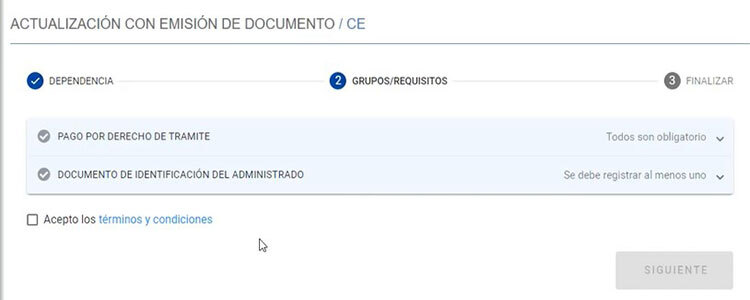
Under Pago por derecho de trámite, you must enter information from your payment receipt:
- Número de recibo
This corresponds to the secuencia de pago on the págalo receipt. - Código de verificación
This is the código de control on the págalo receipt. - Fecha de recibo
This is the fecha de operación on the págalo receipt.
Click Validar after entering the data.
Under Documento de Identificación:
- Select document type (in most cases pasaporte)
- Enter details
- Upload copy
If your passport changed, enter the details of the old registered passport here.
When both tabs show green checks, accept terms and click Siguiente.
Step 5: Upload required documents (part 2)
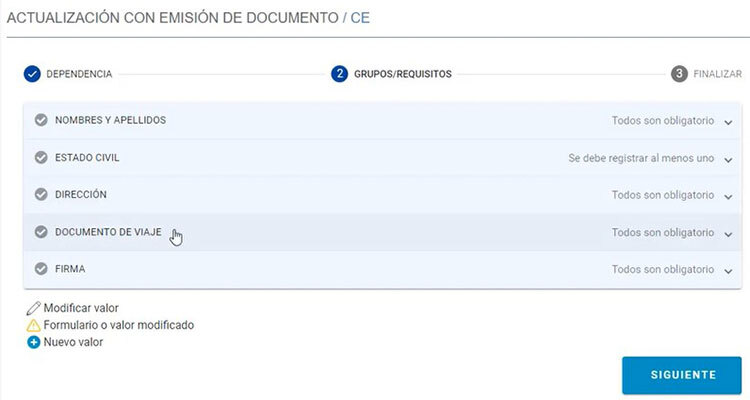
You now see this screen:

Only complete the tab relevant to your change and upload required document for this change. Leave all other tabs untouched.
Examples:
Name change: Open the Nombres y apellidos tab and upload, for example, your passport with your correct name.
Marital status change: Open the Estado civil tab and select the subpoint that applies:
- If you got married, upload your marriage certificate.
- If you got divorced, upload an official document proving that your marriage was dissolved, such as a divorce certificate or other divorce papers.
- If you are widowed, upload the death certificate of your spouse.
Address change: Open the Dirección tab and upload either a property title deed, your rental contract or a sworn statement (Declaración jurada de domicilio)
New passport: Open the Documento de viaje tab, select passport, enter your new passport number and upload a copy of your new passport.
Click Siguiente.
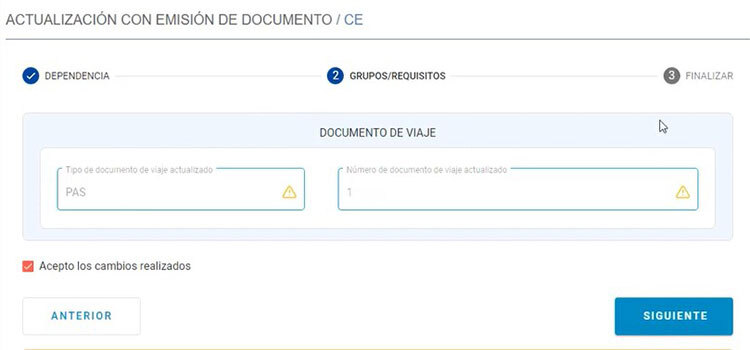
Step 6: Review changes
You now see this page on your screen:

Verify displayed change carefully.
If correct, accept the change and click Siguiente.
Step 7: Confirmation of your application
You will now see the Actualización de datos con emisión de documento document displayed on your screen. This document confirms that your application for updating your information was successfully submitted.
Download and/or print the confirmation and keep it safe.
After submitting your application
After submitting the application, all you can do is wait. The official processing time for approving your application is 3 business days. In practice, however, most applicants receive the notification with the official resolution that the update of the information was registered within a week or two.
Check your Buzón electrónico regularly to make sure you don’t miss any notification.
You can also check the status of your application:
- in the Agencia Digital under Historial de trámites, or
- on the Migraciones website under Consulta de estado de trámite.
Getting your new carné
Once the update is approved, you are still not done. You need your new carné.
So, once again check your Buzon regularly and wait for the Notificación de expedición del carné informing you that your carné was issued. Officially this can take up to 30 business days, but reports range from a few days to two months.
Once notified that your carné is ready, log in to the Agencia Digital and book a pickup appointment under:
- Citas en Línea, subpoint recojo de documentos.
Download and print the appointment confirmation.
Note: Some Migraciones offices may not require appointments for pickup.
If you urgently need your updated carné:
Especially in Lima, getting an appointment to pick up your carné can sometimes turn into a real test of patience. Slots are often fully booked, and availability can appear and disappear quickly. Unfortunately, there is no shortcut here - your only option is to keep checking the system again and again: later the same day, the next day, or a few days later. Persistence usually pays off.
If, for whatever reason, you urgently need proof of your updated carné but can’t secure an appointment to collect the physical card, there is a practical workaround. You can download a document from the Agencia Digital confirming that your carné is valid and already reflects your updated personal data, even if you don’t yet have the new card in hand.
To do this, log in to the Agencia Digital and, on the main page, go to the left-hand menu. Under “Constancias” select “Carné de Extranjería.” A page will open showing the data printed on your carné, including the recent updates. At the bottom of the page, confirm the statement “Estos son los datos con los cuales se emitirá su constancia…” by ticking the small box and then click Siguiente.
You will then see the “Constancia de Emisión de Carné de Extranjería” on your screen. Download it and, if necessary, print it. While it doesn’t replace the physical card, it serves as official proof that your carné is valid and issued with your correct personal information.
Picking up your carné
To collect your carné, be on time and bring:
- passport
- printed appointment confirmation (if applicable)
Staff will direct you to the collection counter where your new card is handed over.
Congrats! You made it.
Update your information without (!) the issuance of a new carné
Below find the requirements for the Actualización de datos sin (!) emisión de documento and a step-by-step application guide.
Requirements for the "Actualización de datos sin emisión de documento"
- Passport
- Carné
- Payment receipt
- Authority: Migraciones
- Code: 07561 - Formulario F-SPE-001
- Concepto: Actualización, inclusión, rectificación y supresión de datos sin emisión de documento
- Fee: S/ 5 (2026)
- Additional documents depending on change:
- Change of employer:
work contract - Change of university, school, etc.:
enrollment certification - Change of religious entity:
letter from the new religious entity
- Change of employer:
Step-by-step guide to the "Actualización de datos con emisión de documento"
Before submitting your application
Prepare PDFs (max. 3 MB each) of all required documents.
Then pay the S/ 5 fee under:
- Authority: Migraciones
- Code: 07561 – Formulario F-SPE-001
- Concept: Actualización, inclusión, rectificación y supresión de datos sin emisión de documento
Payment can be made either online via págalo.pe, or in person at any Banco de la Nación branch.
As you have likely already paid Migraciones fees before, you’ll be familiar with the process. If not, you can find detailed instructions in our article “Paying administration charges and processing fees in Peru.”
Step 1: Access the Migraciones Agencia Digital
Go to the Migraciones Agencia Digital and click Entrar.
On the next page, select Extranjero and fill in the following fields:
- Documento
Select the document you used to enter Peru or that is registered with Migraciones (usually pasaporte or carné). - Número de documento
Enter your passport number or CE number. - Fecha de nacimiento
Enter your date of birth. - Nacionalidad
Select your nationality. Country names are listed in Spanish (for example, EE. UU. for the United States, Alemania for Germany). - Último movimiento migratorio de entrada
Enter the date you last entered Peru. - Código captcha
Complete the captcha.
Click Verificar.
Step 2: Select the procedure
On the main page:
- Use the search bar, or
- Go to Actualización sin emisión de documento in the left menu.
Click to proceed.
Step 3: Choose the Migraciones office
You are now on the Actualización - Dependencia page.
Choose the Migraciones office handling your application (Lima, Cusco, Arequipa, etc.) under Seleccione la dependencia donde desee gestionar su trámite.
Continue to the next step.
Step 4: Upload required documents (part 1)
You are now on the first page of the Actualicación - Grupos/requisitos page. Open each requirement tab and upload the requested documents.
Under Pago por derecho de trámite, you must enter information from your payment receipt:
- Número de recibo
This corresponds to the secuencia de pago on the págalo receipt. - Código de verificación
This is the código de control on the págalo receipt. - Fecha de recibo
This is the fecha de operación on the págalo receipt.
Click Validar after entering the data.
Under Documento de Identificación:
- Select document type (in most cases pasaporte)
- Enter details
- Upload copy
When both tabs show green checks, accept terms and click Siguiente.
Step 5: Upload required documents (part 2)
You are now on the second page of the Actualicación - Grupos/requisitos page.
In most cases, here only the Organización tab is relevant. To update your employer, school/university or religious entity, open the tab, select the point that applies and upload required document. Additionally enter the name of your new company, university/school, religious entity.
The other tabs Datos familiares and Lugar de nacimiento only apply to certain visa types or are rarely needed. Here you could, if applicable, change information regarding your family situation or, in case your birth place was misspelled, apply for a correction.
Click Siguiente.
Step 6: Review changes
Verify displayed change carefully.
If correct, accept the change and click Siguiente.
Step 7: Confirmation of your application
You will now see the Actualización de datos sin emisión de documento document displayed on your screen. This document confirms that your application for updating your information was successfully submitted.
Download and/or print the confirmation and keep it safe. Click Finalizar.
After submitting your application
After submitting the application, all you can do is wait. The official processing time for approving your application is 3 business days. In practice, however, most applicants receive the notification with the official resolution that the update of the information was registered within a week or two.
Check your Buzón electrónico regularly to make sure you don’t miss any notification.
You can also check the status of your application:
- in the Agencia Digital under Historial de trámites, or
- on the Migraciones website under Consulta de estado de trámite.
Congrats! You made it.
Please note: LimaEasy is not a Peruvian government agency, public authority, or law firm. The information provided is based on our best knowledge and is intended as general guidance to help you understand Peruvian immigration regulations and procedures. Regulations, requirements, and administrative practices may change at any time and without prior notice, so we recommend verifying current details with the relevant authorities before acting on this information.
And last but not least: If you notice any inaccuracies or outdated information on this page, please help us keep this guide up to date by leaving a comment below or contacting us via our contact form. Thank you for your support!