
Foreign nationals who are in Peru as tourists or hold another temporary immigration status are not allowed to sign legally binding documents unless they first obtain a special authorization known as the Permiso especial para firmar contratos, also referred to as Permiso especial para suscribir documentos.
This permit is required for signing, among others:
- work contracts
- sworn statements (declaraciones juradas)
- rental or lease agreements
- vehicle purchase contracts
- marriage documents
- property or apartment purchase contracts
Without this permit, any contract or document you sign while in Peru as a tourist or other temporary visa holder is, from a legal standpoint, null and void, can be contested, and is usually not accepted by Peruvian authorities.
For many years, the Permit to sign contracts had to be requested in person at a Migraciones office. Since January 2018, however, the process has been simplified and can now be completed entirely online.
Please note: You can only apply for this permit if you are legally in Peru. Your tourist stay or temporary visa must be valid at the time of application.
Requirements for the Permit to sign contracts
- a valid Passport
- a valid tourist stay or other valid temporary immigration status
Since October 22, 2023, the the Permit to sign contracts is free of charge.
How to apply for the Permit to sign contracts
Step 1: Access the Migraciones Agencia Digital
Go to the Migraciones Agencia Digital and click on Entrar.
On the next page, select Extranjero and fill in the required fields:
- Documento
Select the document you used to enter Peru (usually Pasaporte). - Número de documento
Enter your passport number. - Fecha de nacimiento
Enter your date of birth. - Nacionalidad
Select your nationality. Country names are listed in Spanish (for example, EE. UU. for the US, Alemania for Germany). - Último movimiento migratorio de entrada
Enter the date you entered Peru. - Código captcha
Complete the captcha.
Click Verificar.
Step 2: Select the permit
You are now on the main page of the Agencia Digital.
- Either use the search bar, or
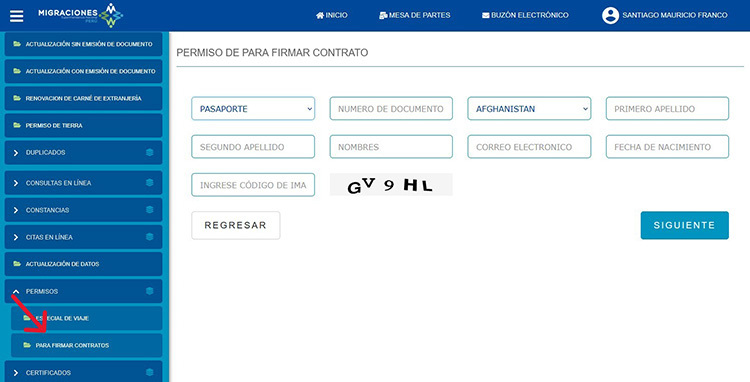
- See the menu on the left, go to Permisos, and select Para firmar contratos
Click on it.
On the next page, you’ll see general information about the permit. Read it and click Siguiente.
Step 3: Enter your personal details
Now fill in the required fields:
- Documento
Select Pasaporte. - Número de documento
Enter your passport number. - Nacionalidad
Select your nationality (in Spanish). - Primer apellido
Enter your first last name.

- Segundo apellido
If you have a second last name, enter it here; otherwise, leave this field blank. - Nombres
Enter your first name(s). - Correo electrónico
Enter a valid email address. - Fecha de nacimiento
Enter your date of birth. - Ingrese código de imagen
Complete the captcha.
Click Siguiente.
Step 4: Review and submit
On the next page:
- Under Condición migratoria, you’ll see your current immigration status and entry date.
- Under Información del permiso, you’ll find:
- the start date of the permit (usually the day you apply)
- the end date, typically 30 days later
Click Acepto, then Finalizar.
After submitting your application
You’ll be taken to a confirmation page titled Permiso especial para firmar contratos, indicating that your permit has been granted.
- In most cases, the permit is sent to your email immediately.
- Occasionally, it may take up to 5 business days.
You can also download or print the permit directly as a PDF by clicking Imprimir.
Important: Keep a copy (digital and/or printed), as you’ll usually need to present it when signing contracts or submitting documents to Peruvian authorities.
Please note: LimaEasy is not a Peruvian government agency, public authority, or law firm. The information provided is based on our best knowledge and is intended as general guidance to help you understand Peruvian immigration regulations and procedures. Regulations, requirements, and administrative practices may change at any time and without prior notice, so we recommend verifying current details with the relevant authorities before acting on this information.
And last but not least: If you notice any inaccuracies or outdated information on this page, please help us keep this guide up to date by leaving a comment below or contacting us via our contact form. Thank you for your support!